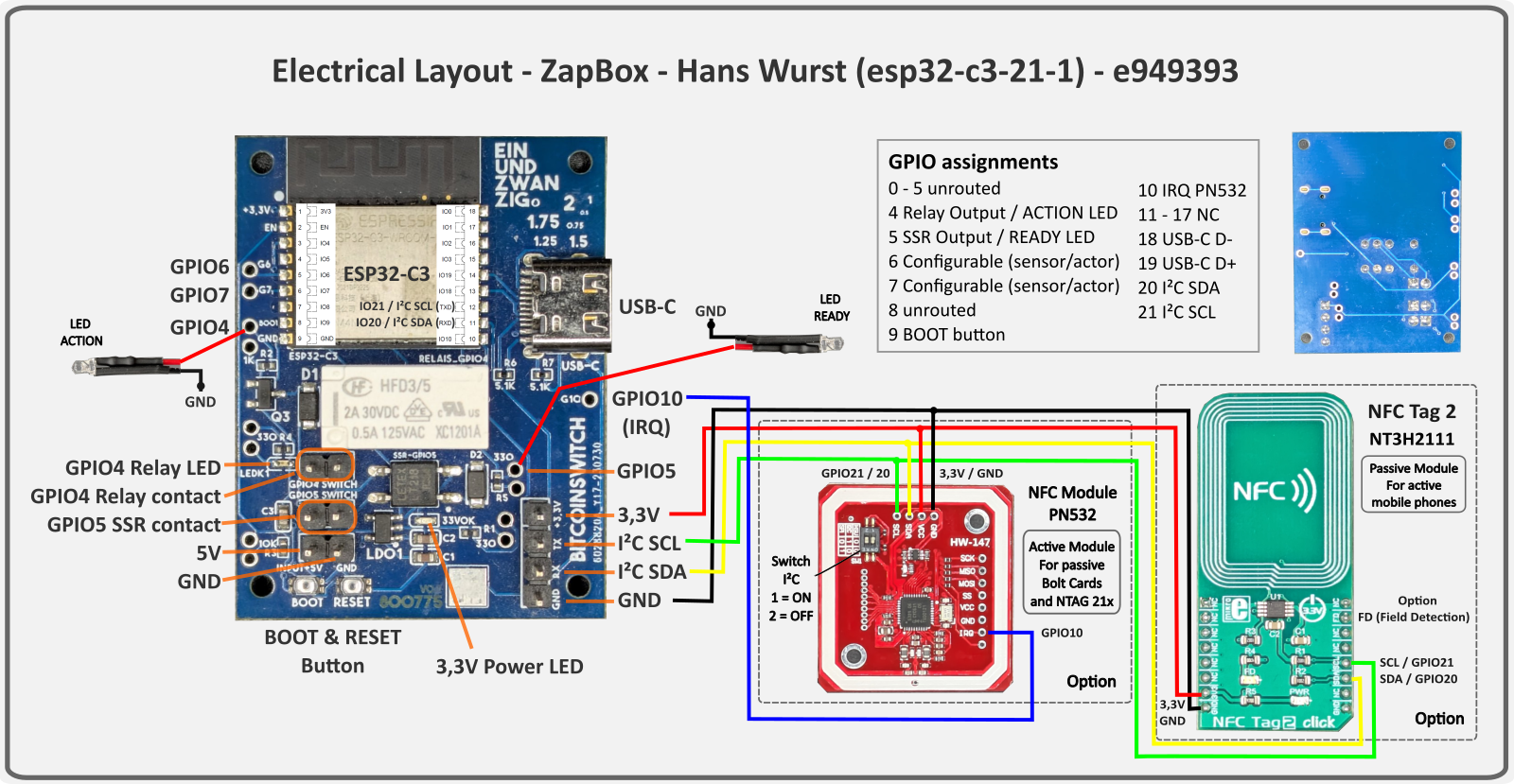
Use with esp32-c3-21-1 (ESP32-C3-WROOM-02 with board design by Hans Wurst)
Other web installers:
T-Display-S3 | Headless | Touch 3.5".
Note: The ESP32-C3-21-1 uses the native USB-C port directly (no USB-UART chip). If flashing fails, hold IO9 (BOOT) LOW while pressing EN (reset), then release IO9 and retry.
After flashing or erasing, the ZapBox automatically starts in configuration mode — the serial log shows "SERIAL CONFIG MODE".
→ The ZapBox is now ready to receive configuration data. ⚙️
To re-enter config mode on a configured device:
Note: The connection stays active for 3 minutes before auto-disconnect.
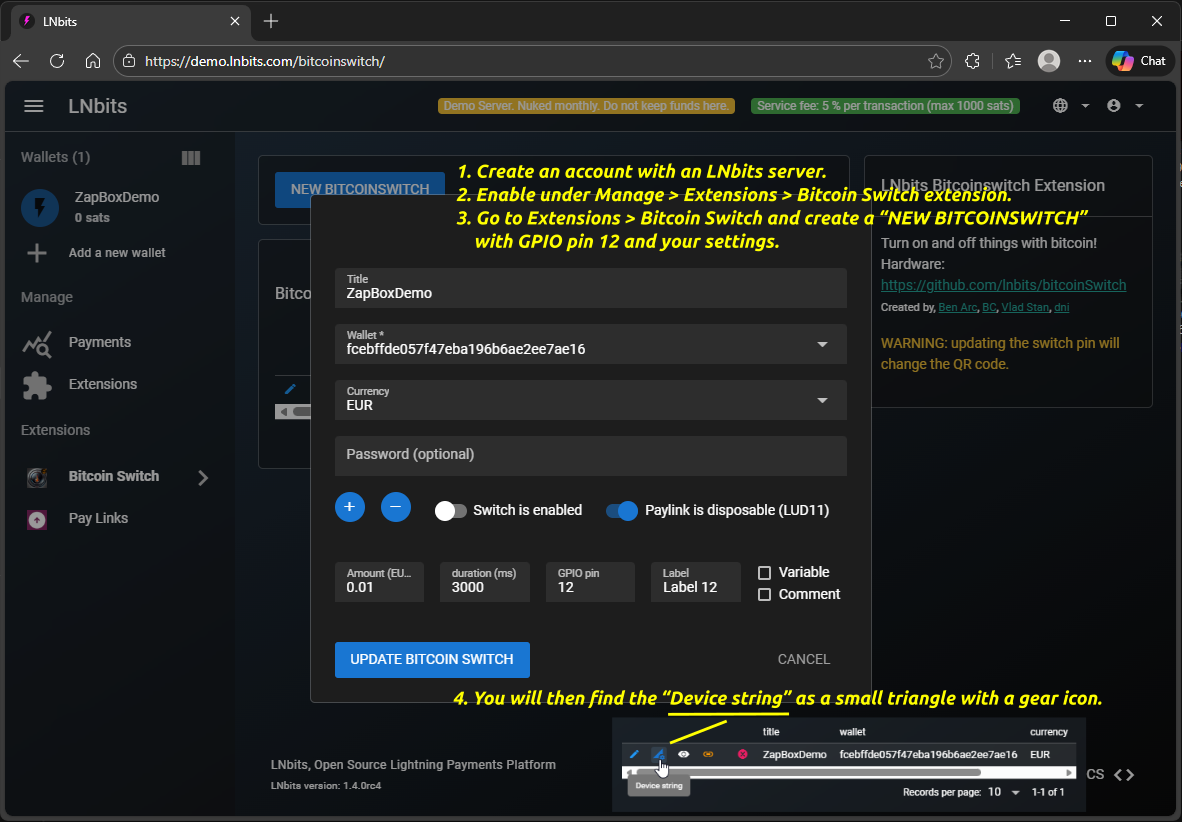
How do I get the device string? Use Bitcoin Switch or ZapBox extension → Help
Outputs
| IO4 | Relay — HFD3/5 (1A 30VDC / 0.5A 125VAC) — main payment relay |
| IO5 | Status / Ready LED — solid ON when ready, blinks in config/error mode |
| IO6 | Flex channel 1 — configurable as relay, servo, or sensor (see below) |
| IO7 | Flex channel 2 — configurable as relay, servo, or sensor (see below) |
Configure the main payment pin in your LNbits extension (bitcoinswitch / zapbox_extension) — use GPIO 4 for the primary relay. IO6 and IO7 always trigger together with IO4.
Flex Channels — GPIO 6 & GPIO 7
Both flex channels are triggered together with GPIO 4 when configured as actor (relay / servo). In sensor mode, they block or stop payments based on the sensor input (INPUT_PULLUP, active LOW — connect sensor signal to GND when triggered).
Function for GPIO pin 6 (flex channel 1)
Function for GPIO pin 7 (flex channel 2)
Operating modes explained:
| Relay function | Switches an external relay together with IO4 on every payment activation. |
| 180° servo | Moves a positional servo from start angle to end angle over the configured duration. Returns to start angle after duration. |
| 360° servo | Runs a continuous rotation servo at the configured speed for the configured duration (90 = stop, <90 = CCW, >90 = CW). |
| Stop the advance | Stops the relay action when the sensor detects a product (LOW signal). Minimum action time of 2 seconds before the sensor can trigger. |
| Monitoring product blockage | After a payment, checks if the product exit is blocked (sensor LOW). Blocks further payments until the path is cleared. |
| Level monitoring | Continuously monitors the supply bin fill level. When the sensor goes HIGH (no product detected), the bin is considered empty and payments are blocked until restocked. |
leave empty for normal mode (default)
4 = Relay (default)
The NFC Bolt Card functionality requires the LNbits extension "zapbox_extension". The ZapBox automatically detects which extension is installed on your server — no manual configuration required. If "zapbox_extension" is active, NFC Bolt Card payments are available out of the box. If only "bitcoinswitch_extension" (Bitcoin Switch) is installed, the ZapBox switches to that automatically.
Repositories from where the extensions can be downloaded:
https://installer.zapbox.space/extensions.json
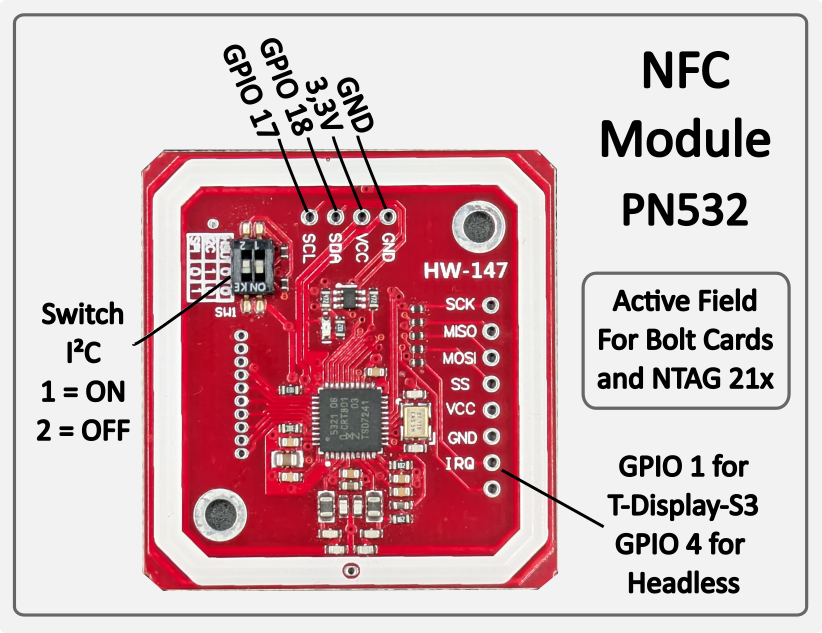
Bolt Cards & NTAG 21x (PN532, I²C 0x24) — Active NFC reader: the PN532 generates its own magnetic field and reads cards placed on it. Supports pre-programmed Bolt Cards for contactless Lightning payment. Also reads passive NFC tags of type NTAG 213, 215 and 216 — e.g. for LNURL-based payment tags. Works with all major Lightning wallets and PoS systems. No configuration required — the module is auto-detected on the I²C bus at startup.
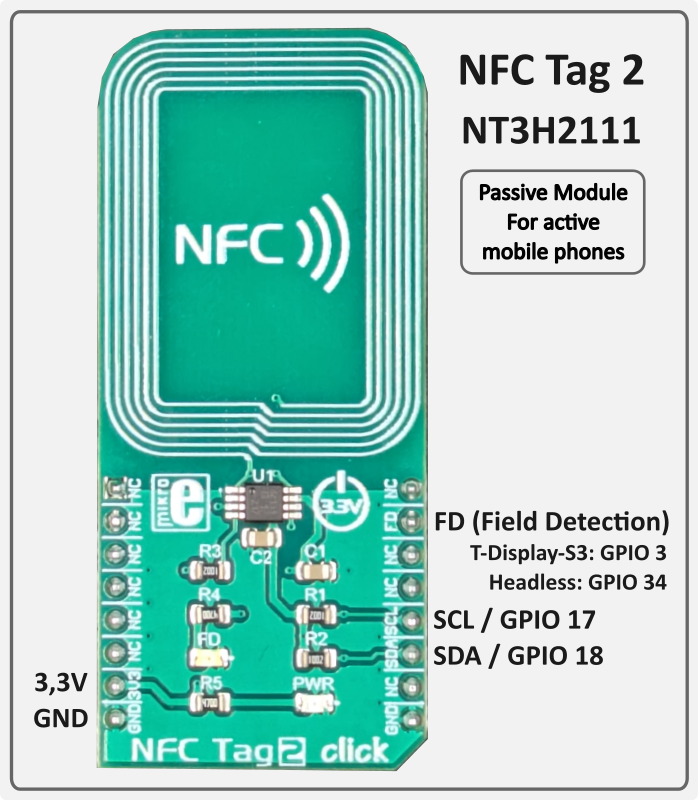
Mobile Phones (NFC Tag 2 / NT3H2111, I²C 0x55) — Passive NFC tag: unlike the PN532, the NT3H2111 generates no field of its own. It is a true NTAG chip that delivers the LNURL autonomously as soon as the active field of an approaching mobile phone is detected. The ZapBox writes the current LNURL to the chip via I²C — the ESP32 is not involved during the tap. Compatible with Android NFC Tools and wallets that support LNURL via NFC (e.g. Phoenix). No configuration required — auto-detected at startup.
Both modules operate independently and in parallel on the shared I²C bus (GPIO 20 SDA / GPIO 21 SCL — pin header on the ESP32-C3-21-1 board). If a module is not connected, it is simply skipped — normal operation is not affected. The PN532 IRQ line connects to GPIO 10.
The ZapBox features a hierarchical error detection system with automatic diagnostics. Error states show distinct blink patterns on IO5 (status LED):
| Priority | Error Type | LED Pattern | Description |
|---|---|---|---|
| 1 (Highest) | NO WIFI | 1 blink | WiFi network not connected → Wifi data correct? → WiFi signal too weak? |
| 2 | NO INTERNET | 2 blinks | Internet connectivity lost → Internet accessible? |
| 3 | NO SERVER | 3 blinks | LNbits server unreachable → Server hardware down? → Device string correct? |
| 4 (Lowest) | NO WEBSOCKET | 4 blinks | WebSocket protocol/handshake failure → LNbits down? → Device string correct? |
Note: Higher priority errors override lower priority error displays. Each error pattern has a 2 second pause between sequences. Use the serial terminal to monitor detailed error messages.
Note: The ESP32-C3-21-1 has no display — there is no visual Report page. Use the serial terminal to monitor all errors and status messages.
If a wallet scanning the QR code shows an error message, here's what it means:
"bitcoinswitch ... is disabled" → The Bitcoin Switch was actively disabled in LNbits
"No active bitcoinswitch connections" → The handshake between the wallet and ZapBox failed. → Wait or restart the ZapBox to re-establish the connection.
Relay does not switch, but payment was successful → Wrong GPIO pin configured in LNbits?
If you tap an NFC Bolt Card or NTAG21x tag and the serial log shows:
[WARN][NFC] Bolt Card tap detected – NFC is not supported by the active extension (bitcoinswitch).
[WARN][NFC] To use NFC / Bolt Cards, switch to zapbox_extension (apiPath = "zapbox").
This means the device is configured with the bitcoinswitch_extension, which does not have an NFC endpoint (/api/v1/nfc/). NFC payments are only supported by the zapbox_extension.
Solution:
This is not a hardware problem – the NFC reader works fine. It's purely a server-side configuration issue.
{"detail":"LNURLW callback error: Payment failed - "}
The sending wallet and the receiving wallet in LNbits are the same. The Bolt Card wallet and the receiving wallet must be different wallets in LNbits.
Main page: https://zapbox.space
GitHub – ZapBox: https://github.com/AxelHamburch/ZapBox
GitHub – zapbox_extension: https://github.com/AxelHamburch/zapbox_extension
Web Installer Backups: https://ereignishorizont.xyz/zapbox-backup/