Use with JC3248W535C (ESP32-S3, 3.5" QSPI touch display, 480×320).
Other web installers:
T-Display-S3 | Headless | ESP32-C3-21-1
Note: The configuration data can be deleted using "Erase device." Otherwise, it will be retained even with the new firmware.
Note on the Touch 3.5" version: This firmware runs on the JC3248W535C module — ESP32-S3-WROOM-1 with 3.5" IPS 480×320 QSPI display and capacitive multi-touch. The display replaces LEDs for all status feedback. Serial logs are still available for diagnostics.
When you flash a new ESP32-S3 or use "Erase device." the ZapBox automatically starts in configuration mode. The display shows "CONF / SERIAL CONFIG MODE".
→ The ZapBox is now ready to receive configuration data. ⚙️
If parameters have already been saved and need to be changed, you can also open CONF mode retrospectively:
Note: The connection will remain active for 3 minutes (180 seconds) before it is automatically disconnected. If data is already available, you can terminate the connection prematurely by pressing the BOOT button or tapping the touchscreen HELP area.
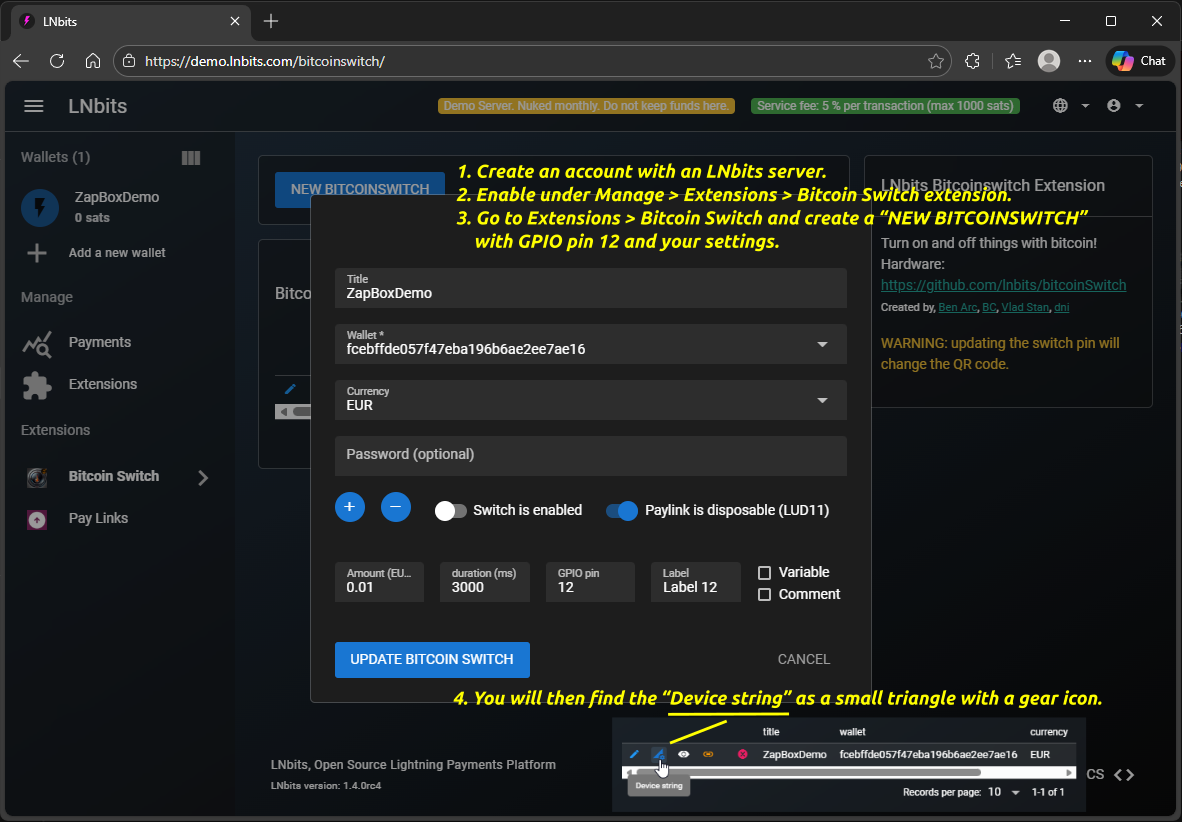
How do I get the device string? Use Bitcoin Switch or ZapBox extension → Help
Note: The default is Bech32. LUD-17 is easier to scan, but is not yet supported by all types of wallets.
Multi-Channel Mode
The ZapBox Touch 3.5" supports up to 6 independent relay channels. Each channel maps to a GPIO output that can switch a relay, solenoid, or any other 3.3 V-driven load.
Available GPIO channels:
| CH01 | GPIO 5 | (default) |
| CH02 | GPIO 6 | |
| CH03 | GPIO 7 | |
| CH04 | GPIO 9 | |
| CH05 | GPIO 14 | |
| CH06 | GPIO 15 |
Each channel is configured independently in your LNbits extension (zapbox / bitcoinswitch) — each switch gets its own QR code and amount. The device activates exactly the GPIO returned in the "paid" event.
Reserved GPIOs (not available as relay channels):
GPIO 17 / GPIO 18 — I²C bus (touch controller AXS15231B + NFC reader PN532, always active)
GPIO 16 — touch interrupt (INT line of AXS15231B, shared with NFC IRQ)
GPIO 46 — strapping pin reserve (do not connect external load)
GPIO 21 — display backlight PWM (managed by firmware)
Choose pulsing/blinking mode for relay control
Note: Special modes control how the relay switches during the configured duration. "Standard" means simple on/off. Other modes create pulsing/blinking patterns with configurable frequency and duty cycle.
Control when Bitcoin price/block info is shown
E.g. USD, EUR, GBP, JPY, CHF, TRY, CAD, BRL, CUP, etc.
OFF: No ticker shown (Multi-Channel: productSelectionScreen; Single: only QR code)
ON - always: Ticker overlays screen, navigate with swipe to show products temporarily (returns after timeout)
ON - when selecting: Single: Ticker only visible for a short time after swipe. Multi-Channel: productSelectionScreen → products → ticker (at end of product cycle)
leave empty for normal mode (default)
5 (default CH01)
Note: As soon as something is entered in the "Wallet Invoice/Read Key" field, "THRESHOLD MODE" becomes active. "NORMAL MODE" then no longer works. The data specified in the bitcoinSwitch extension, such as amount, PIN, and time, is ignored. Only a payment to the wallet with the invoice key counts.
How can I use this? Either by receiving payment directly into the wallet or by using the "Pay Links" extension. There you can get a static LNURL and even a lightning address. Payments to these addresses then trigger the pin, provided the threshold value is reached or exceeded.
1-120 minutes (default: 5)
1-120 minutes (default: 30)
Use Cases: Energy saving (screensaver ~80-90%, light sleep ~99%, freeze ~99.9%), reducing device heat, extending display lifespan in always-on scenarios.
Note: Touch the screen (GPIO 16 INT) to wake from screensaver or light sleep mode.
The NFC Bolt Card functionality requires the LNbits extension "zapbox_extension". The ZapBox automatically detects which extension is installed on your server — no manual configuration required. If "zapbox_extension" is active, NFC Bolt Card payments are available out of the box. If only "bitcoinswitch_extension" (Bitcoin Switch) is installed, the ZapBox switches to that automatically.
Repositories from where the extensions can be downloaded:
https://installer.zapbox.space/extensions.json
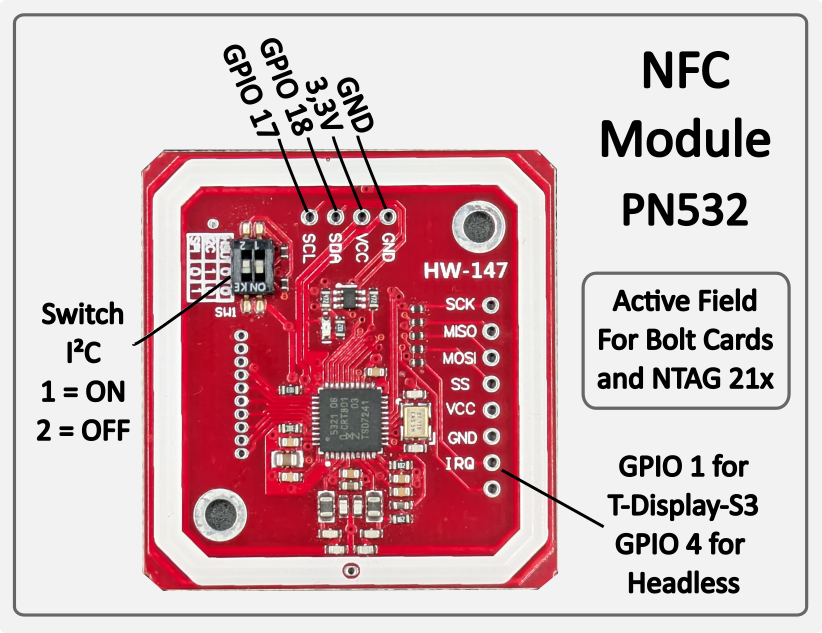
Bolt Cards & NTAG 21x (PN532, I²C 0x24) — Active NFC reader: the PN532 generates its own magnetic field and reads cards placed on it. Supports pre-programmed Bolt Cards for contactless Lightning payment. Also reads passive NFC tags of type NTAG 213, 215 and 216 — e.g. for LNURL-based payment tags. Works with all major Lightning wallets and PoS systems. No configuration required — the module is auto-detected on the I²C bus at startup.
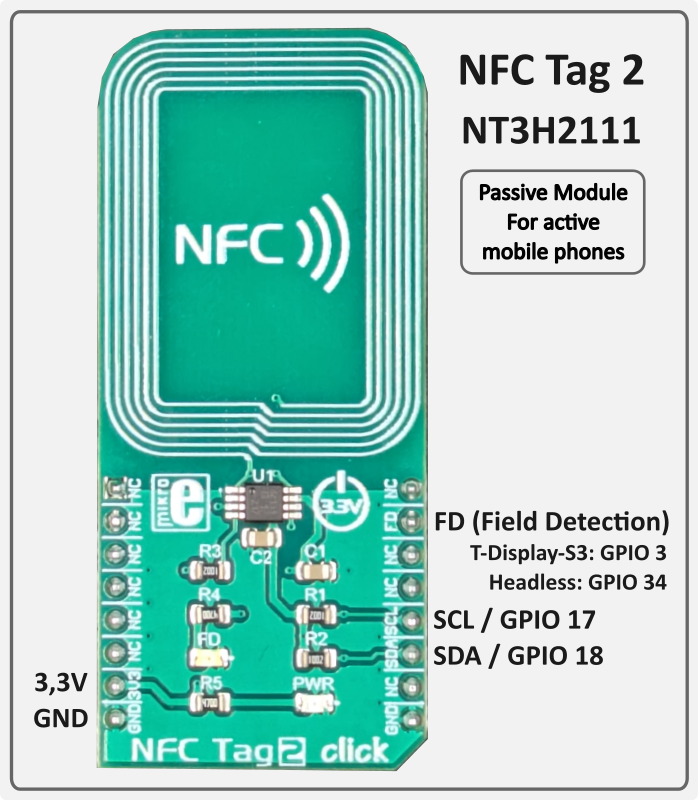
Mobile Phones (NFC Tag 2 / NT3H2111, I²C 0x55) — Passive NFC tag: unlike the PN532, the NT3H2111 generates no field of its own. It is a true NTAG chip that delivers the LNURL autonomously as soon as the active field of an approaching mobile phone is detected. The ZapBox writes the current LNURL to the chip via I²C — the ESP32 is not involved during the tap. Compatible with Android NFC Tools and wallets that support LNURL via NFC (e.g. Phoenix). No configuration required — auto-detected at startup.
Both modules operate independently and in parallel on the shared I²C bus (GPIO 17 SCL / GPIO 18 SDA — same bus as the touch controller). If a module is not connected, it is simply skipped — normal operation is not affected.
PCF8574 on I2C (SDA=GPIO18, SCL=GPIO17) – address 0x20 (A0/A1/A2 all to GND)
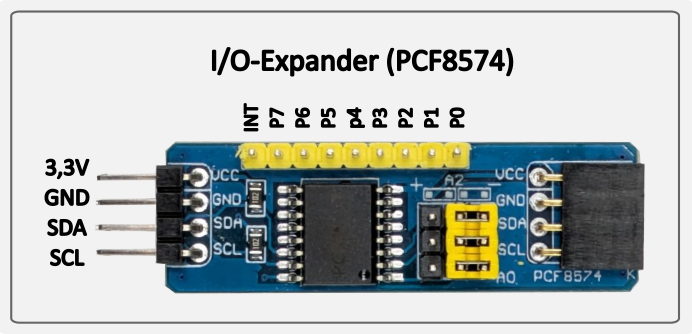
PCF8574 wiring example
The ZapBox features a hierarchical error detection system with automatic diagnostics. Errors are displayed on screen with abbreviations:
| Priority | Error Type | Abbreviation | Description |
|---|---|---|---|
| 1 (Highest) | NO WIFI | NW | WiFi network not connected → Wifi data correct? → WiFi signal too weak? |
| 2 | NO INTERNET | NI | Internet connectivity lost → Internet accessible? |
| 3 | NO SERVER | NS | LNbits server unreachable → Server hardware down? → Device string correct? |
| 4 (Lowest) | NO WEBSOCKET | NWS | WebSocket protocol/handshake failure → LNbits down? → Device string correct? |
Note: Higher priority errors override lower priority error displays. For example, if WiFi is down, all other checks are skipped and only "NO WIFI" is shown.
All errors with their occurrence counts (0-99) are logged on the Report page. To access the Report page:
If a wallet scanning the QR code shows an error message, here's what it means:
"bitcoinswitch ... is disabled" → The Bitcoin Switch was actively disabled in LNbits
"No active bitcoinswitch connections" → The handshake between the wallet and ZapBox failed. → Wait or restart the ZapBox to re-establish the connection.
Relay does not switch, but payment was successful → Wrong GPIO pin configured in LNbits?
If you tap an NFC Bolt Card or NTAG21x tag and see "NFC not supported" on the display (shown for 5 seconds), and the serial log shows:
[WARN][NFC] Bolt Card tap detected – NFC is not supported by the active extension (bitcoinswitch).
[WARN][NFC] To use NFC / Bolt Cards, switch to zapbox_extension (apiPath = "zapbox").
This means the device is configured with the bitcoinswitch_extension, which does not have an NFC endpoint (/api/v1/nfc/). NFC payments are only supported by the zapbox_extension.
Solution:
This is not a hardware problem – the NFC reader works fine. It's purely a server-side configuration issue.
{"detail":"LNURLW callback error: Payment failed - "}
The sending wallet and the receiving wallet in LNbits are the same. The Bolt Card wallet and the receiving wallet must be different wallets in LNbits.
Main page: https://zapbox.space
Web installer – T-Display-S3: https://installer.zapbox.space
Web installer – Headless (esp32dev): https://installer.zapbox.space/headless/
Web installer – Touch 3.5" (JC3248W535C): https://installer.zapbox.space/touch3.5/
GitHub – ZapBox: https://github.com/AxelHamburch/ZapBox
GitHub – zapbox_extension: https://github.com/AxelHamburch/zapbox_extension
Extension manifest source: https://installer.zapbox.space/extensions.json
Web Installer Backups: https://ereignishorizont.xyz/zapbox-backup/
LNbits: https://lnbits.com/
MakerBits Telegram Gruppe: https://t.me/makerbits